
Skip to content

  • Outlet Lists
  • Employee Directory
  • Stores Locator
  • KnowledgeBase
  • IT FormsExpand
    • IT Equipment Checkout
    • Outlet IT Assets Handover Form
Popular Search closinghow topromotionhowcancel

POS System

  • How to Exclude Items from Promotions in ARMS POS?
  • How To Cancel Bill in ARMS POS?
  • How To Reprint Transaction and Settlement?
  • How to Redeem Voucher in ARMS POS?
  • How to Redeem Coupon in ARMS POS?
  • How To Force Close and Restart ARMS POS When Not Responding?
  • How to Create a Temporary SKU in ARMS POS?
  • Atome BNPL Payment
  • Gempak Giler (Mega Sale 2024) – RM100 INSTANT REBATE
  • How to Unlock ARMS POS?
  • How to login ARMS POS System?
  • How to logout from POS System?
  • How to cash in (float money) into POS system?
  • How to issue receipt/invoice? (without promotion item)
  • How to issue receipt/invoice for bundle promotion?
  • How to perform Item Discount?
  • Reprint Receipt
  • Why I unable to refresh (F5 key) the POS system screen?
  • How to delete item/SKU in POS system Screen?
  • How to Prune Receipt?
  • How to perform Goods Return (Exchange)?

Inventory

  • How To Perform Goods Receiving with Delivery Order (DO)? (Stock In)
  • How To Perform Goods Receiving with Purchase Order (PO)? (Stock In)
  • How To Perform Delivery Order (DO) Transfer? (Stock Transfer)
  • How To Perform Delivery Order Checkout?

Account

  • Atome BNPL Payment

OC Membership

  • How To Redeem a Coupon from OC Membership
  • How To Issue Receipt with OC Membership
  • OC Membership – Register as new member

Ticketing System

  • OC Helpdesk User Guideline (Ticket Submission)

Microsoft

  • Microsoft Teams Communication
  • How to Create a Team and Channel in Microsoft Teams
View Categories
  • Home
  • KnowledgeBase
  • Account
  • Atome BNPL Payment

Atome BNPL Payment

Introduction Atome

[MY] Onboarding Deck (V2.0) OCDownload

Important Notes:

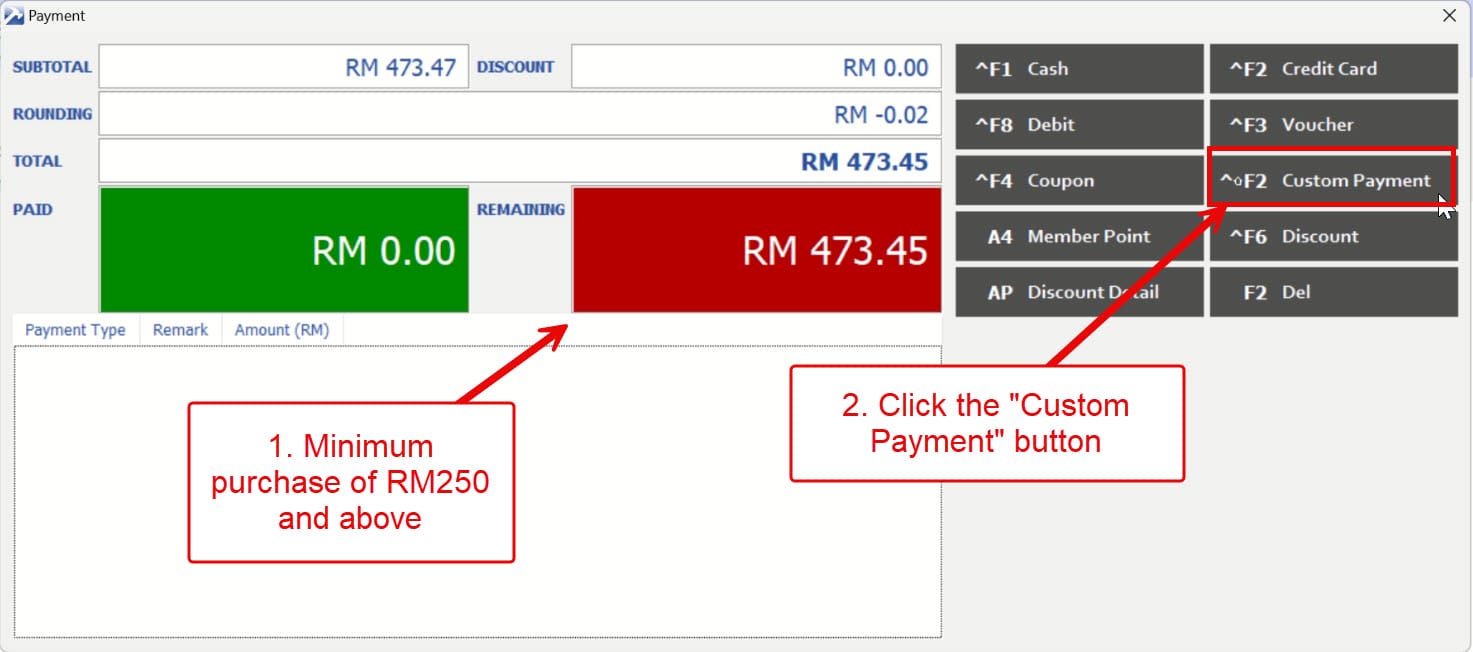
  • Minimum purchase of RM250 and above.
  • Customer must be a registered Atome user

Exchange for Receipt with Atome Payment:

  1. If the exchange item’s value is higher than the original purchase:
    • Customer must pay the difference via Cash, Credit Card, or E-wallet
    • The additional payment cannot be made through Atome.
  2. If the exchange item’s value is lower than the original purchase:
    • Please note that no refund will be provided for the price difference
    • Ensure customer acknowledges and agrees to this policy before proceeding with the exchange

Refund Process for Receipt with Atome Payment:

  1. All refunds require prior approval from Operation Manger (OM) or Assistant Operations Manager (AOM).
  2. After obtaining approval, notify the Accounts Department via Whatsapp or Email salesreport@originalclassic.com.my, weiling.lye@oc.com.my
  3. Please note refund processing time: 5 to 7 business days and Customer should be informed of this processing timeframe.


How to Issue Receipt with Atome Payment:

1. Scan the SKU barcodes of the items. If the total purchase amount is RM250 or more, proceed to the payment screen by clicking the “Payment” button.

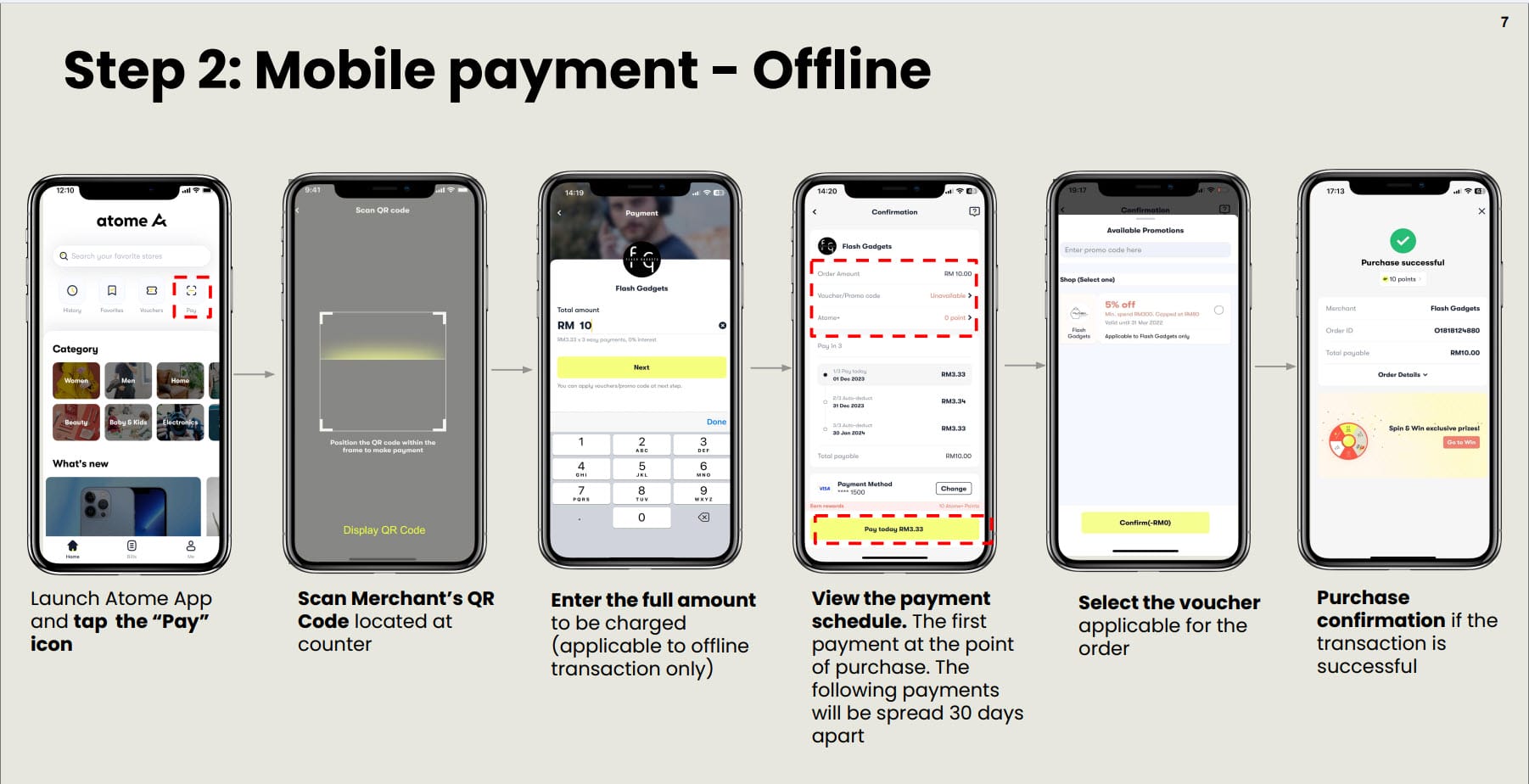
2. Customer to follow below steps to make payment with Atome:

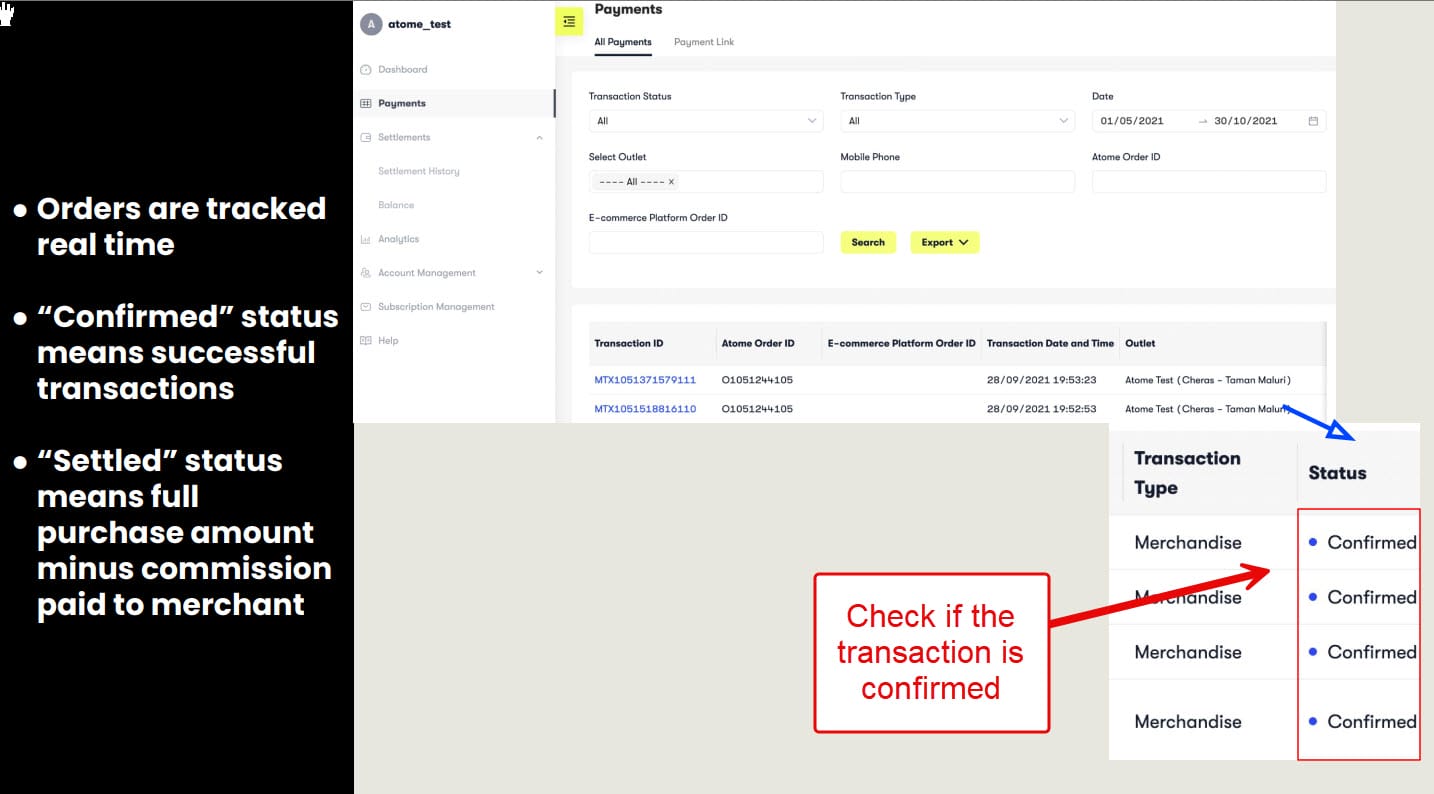
3. After the customer complete the Atome payment, log into the Atome portal https://portal.atome.my/ and verify if the payment confirmation.

NOTE: Make sure the Atome transaction status is “CONFIRMED” before proceeding to final payment in ARMS POS.

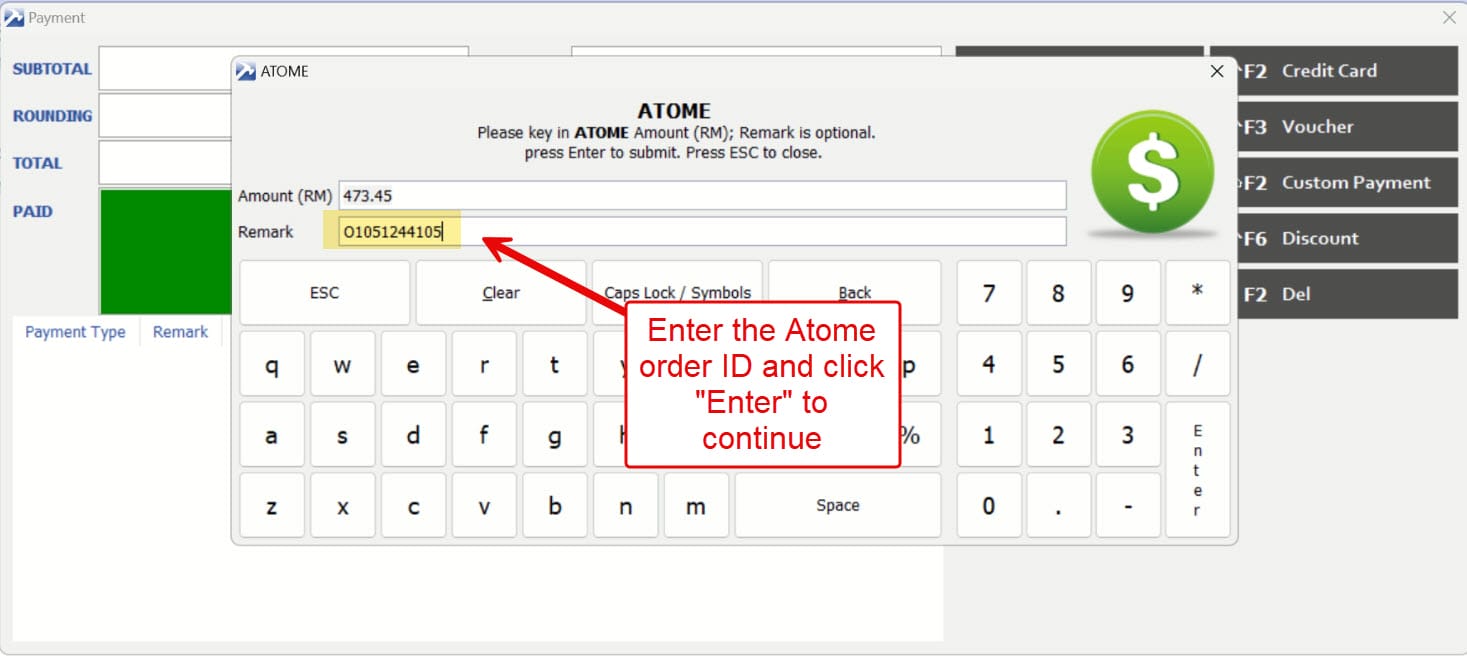
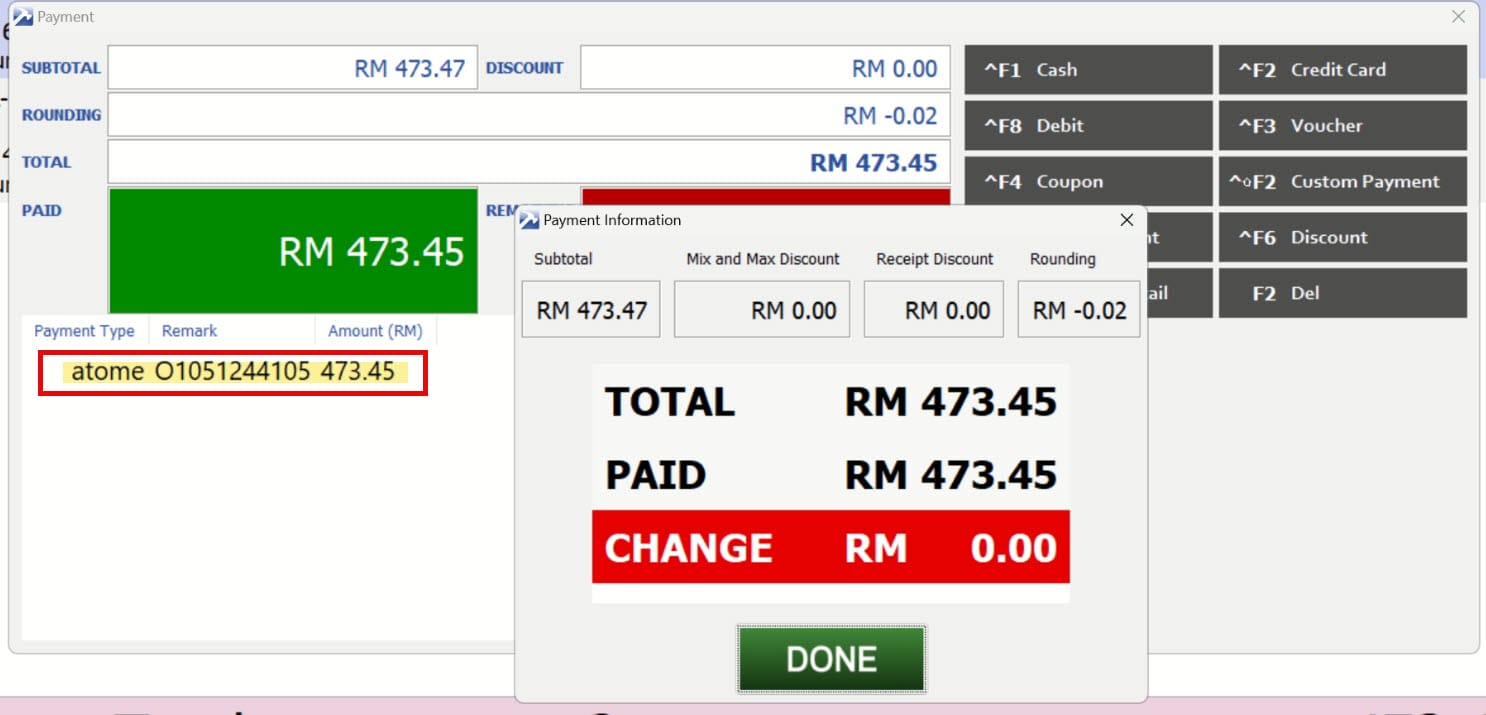
4. Enter the Atome Order ID and click “Enter” to proceed.

5. Once payment is successful, the Atome payment will be captured for the transaction.


Updated on 02/01/2026

© 2026

Scroll to top
  • Outlet Lists
  • Employee Directory
  • Stores Locator
  • KnowledgeBase
  • IT Forms
    • IT Equipment Checkout
    • Outlet IT Assets Handover Form