Skip to content

  • Outlet Lists
  • Employee Directory
  • Stores Locator
  • KnowledgeBase
  • IT FormsExpand
    • IT Equipment Checkout
    • Outlet IT Assets Handover Form
Popular Search closinghow topromotionhowcancel

POS System

  • How to Exclude Items from Promotions in ARMS POS?
  • How To Cancel Bill in ARMS POS?
  • How To Reprint Transaction and Settlement?
  • How to Redeem Voucher in ARMS POS?
  • How to Redeem Coupon in ARMS POS?
  • How To Force Close and Restart ARMS POS When Not Responding?
  • How to Create a Temporary SKU in ARMS POS?
  • Atome BNPL Payment
  • Gempak Giler (Mega Sale 2024) – RM100 INSTANT REBATE
  • How to Unlock ARMS POS?
  • How to login ARMS POS System?
  • How to logout from POS System?
  • How to cash in (float money) into POS system?
  • How to issue receipt/invoice? (without promotion item)
  • How to issue receipt/invoice for bundle promotion?
  • How to perform Item Discount๏ผŸ
  • Reprint Receipt
  • Why I unable to refresh (F5 key) the POS system screen?
  • How to delete item/SKU in POS system Screen?
  • How to Prune Receipt?
  • How to perform Goods Return (Exchange)?

Inventory

  • How To Perform Goods Receiving with Delivery Order (DO)? (Stock In)
  • How To Perform Goods Receiving with Purchase Order (PO)? (Stock In)
  • How To Perform Delivery Order (DO) Transfer? (Stock Transfer)
  • How To Perform Delivery Order Checkout?

Account

  • Atome BNPL Payment

OC Membership

  • How To Redeem a Coupon from OC Membership
  • How To Issue Receipt with OC Membership
  • OC Membership – Register as new member

Ticketing System

  • OC Helpdesk User Guideline (Ticket Submission)

Microsoft

  • Microsoft Teams Communication
  • How to Create a Team and Channel in Microsoft Teams
View Categories
  • Home
  • KnowledgeBase
  • Ticketing System
  • OC Helpdesk User Guideline (Ticket Submission)

OC Helpdesk User Guideline (Ticket Submission)

The OC Helpdesk system is the official platform for all staff to submit service requests, report issues, and communicate with the support team. Please ensure you:

  • Provide clear and accurate details to help our team resolve your request efficiently
  • Always attach supporting files or screenshots (if applicable).
  • Use your official account credentials when logging in.

1. Go to the Portal Link

Open your browser and visit:
https://helpdesk.ocsports.com.my/


2. Login

Enter your Username and Password, then click Log in.
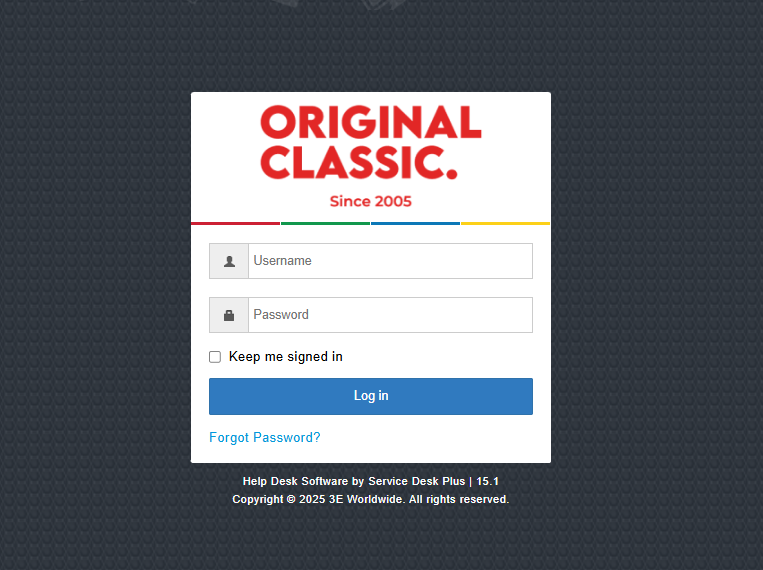

3. Go to the Home Page

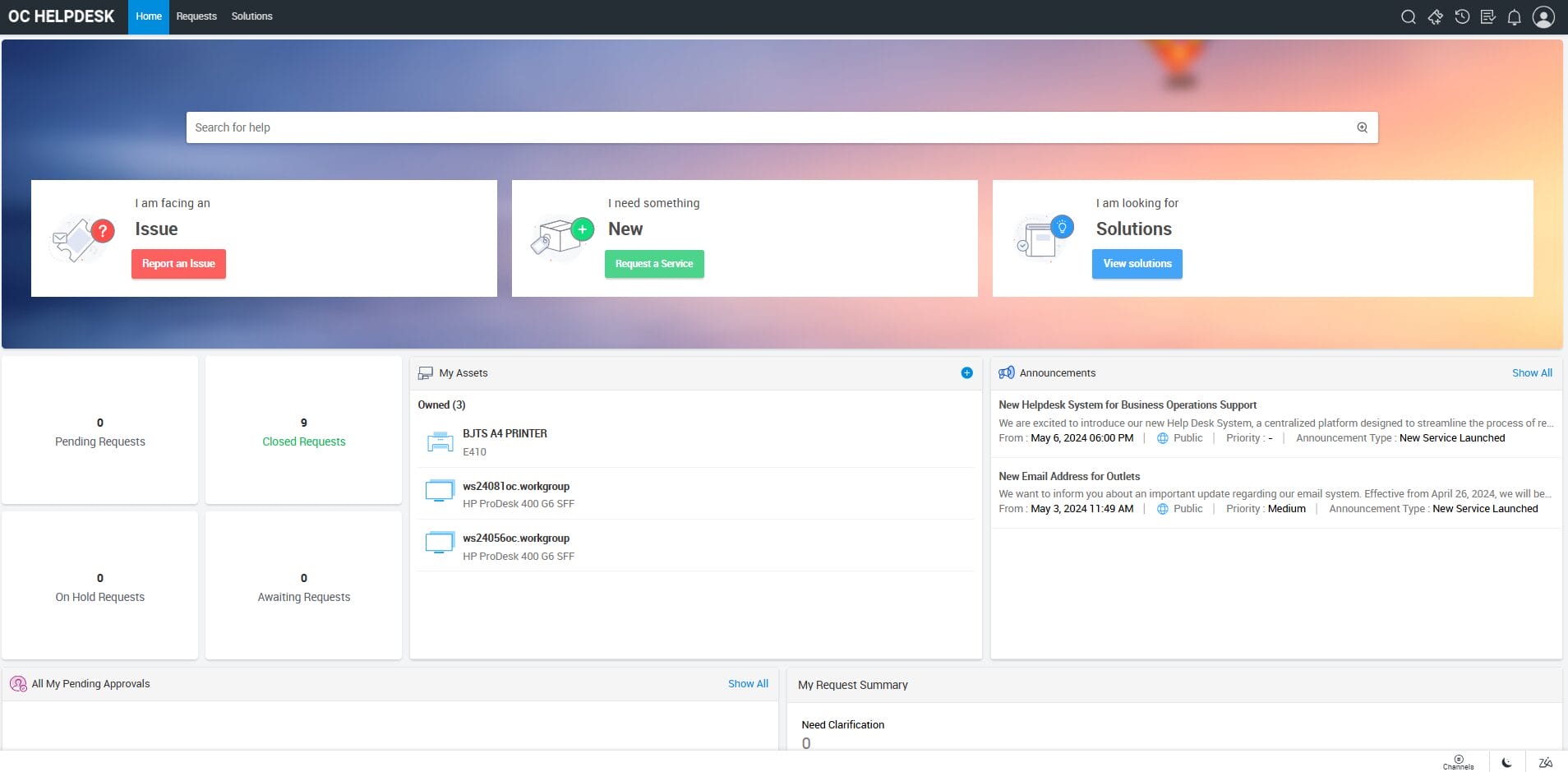
After logging in, youโ€™ll be directed to the Home Page.


4. Raise a Ticket

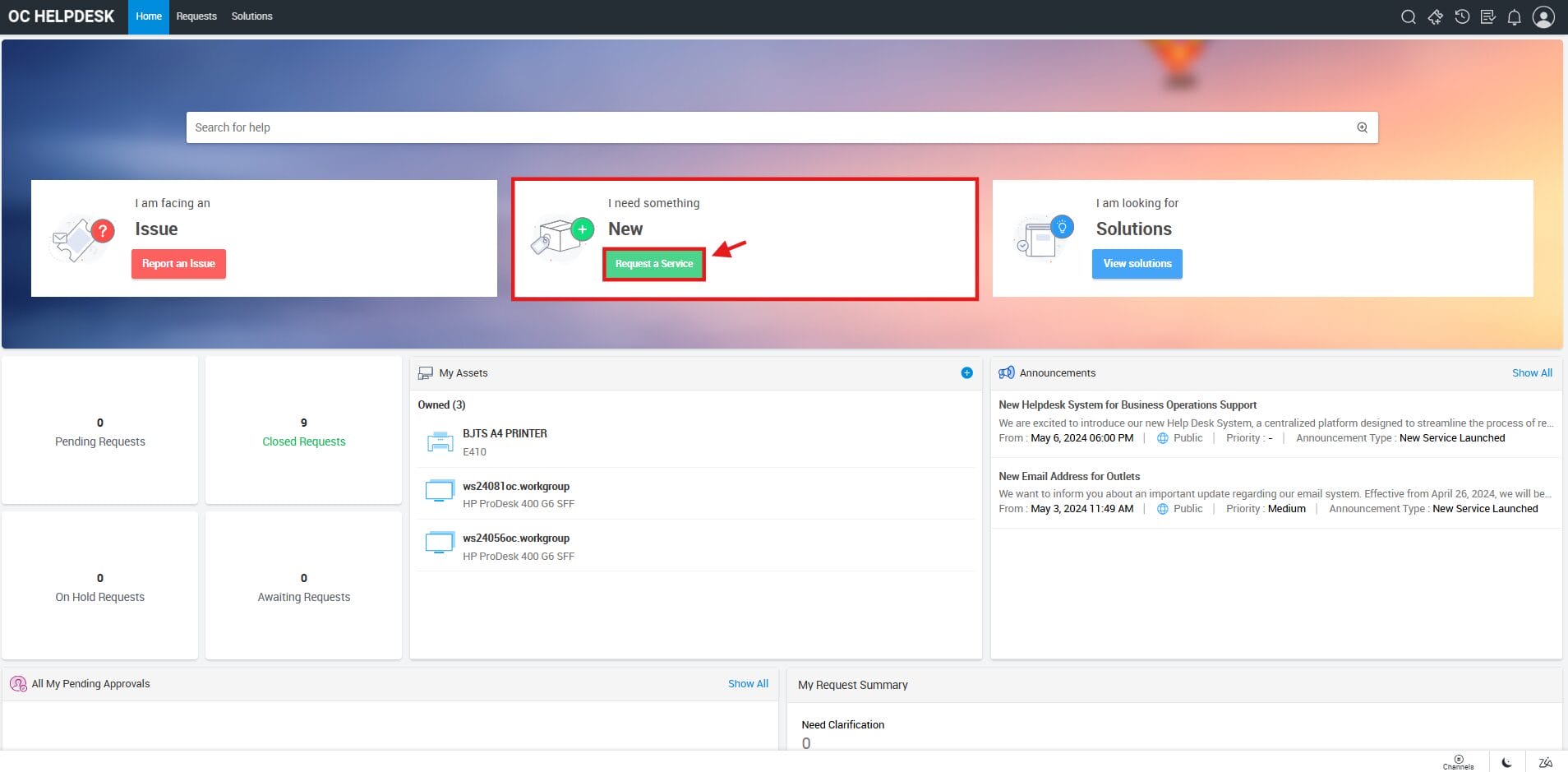
On the home page, you can choose one of the following:

  • Report an Issue
  • Request a Service
  • View Solutions

๐Ÿ‘‰ Example: If you want to request a service, click on โ€œRequest a Serviceโ€.


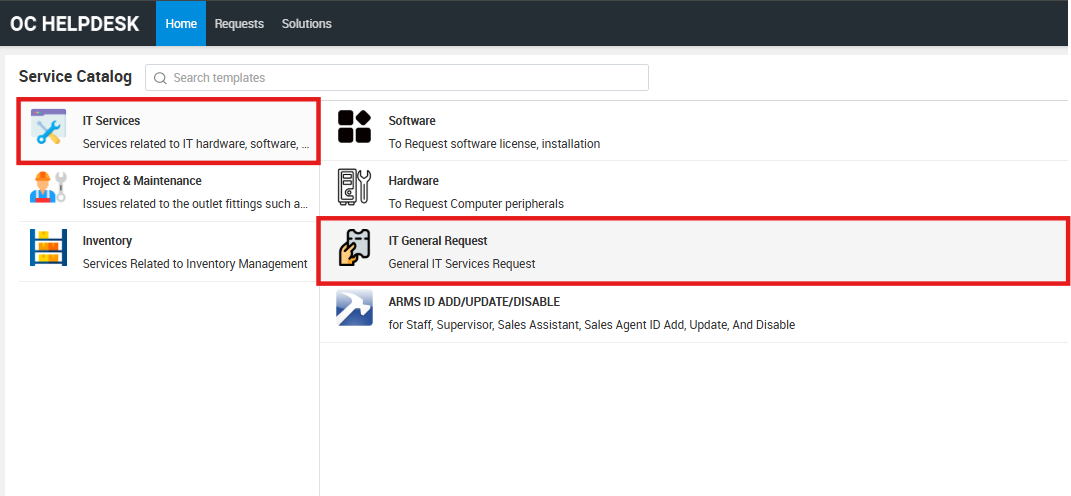
5. Select Service Catalog

To request a service, choose your Service Catalog.
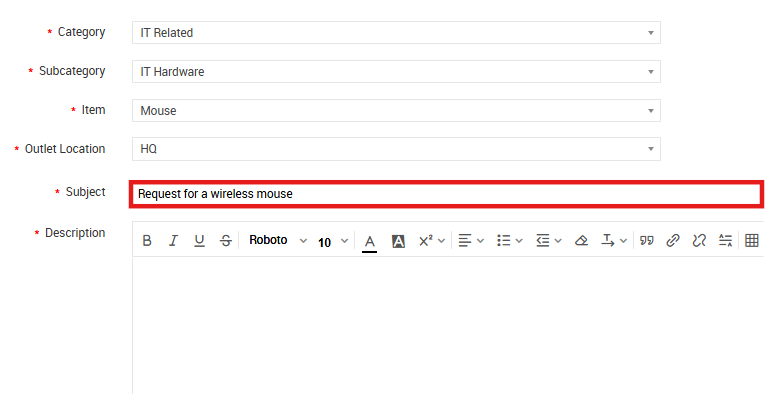
๐Ÿ‘‰ Example: If you want to make an IT-related request, select IT Services > IT General Request.

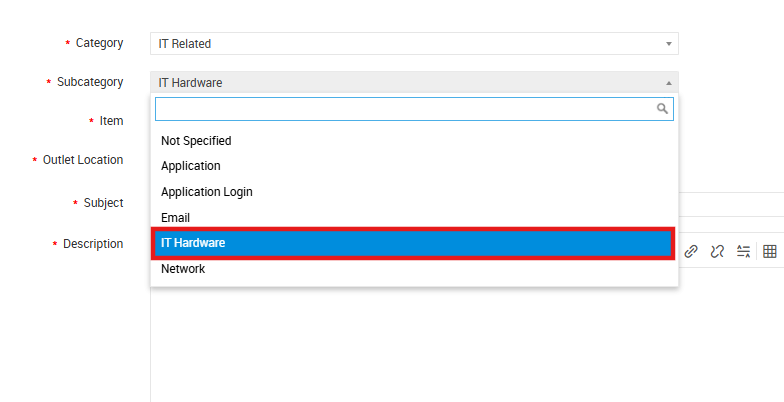
6. Select Subcategory

Choose the relevant Subcategory based on your issue or request type, such as:

  • Application
  • Application Login
  • Email
  • IT Hardware
  • Network

๐Ÿ‘‰ Example: If you want to request for hardware, select IT Hardware.

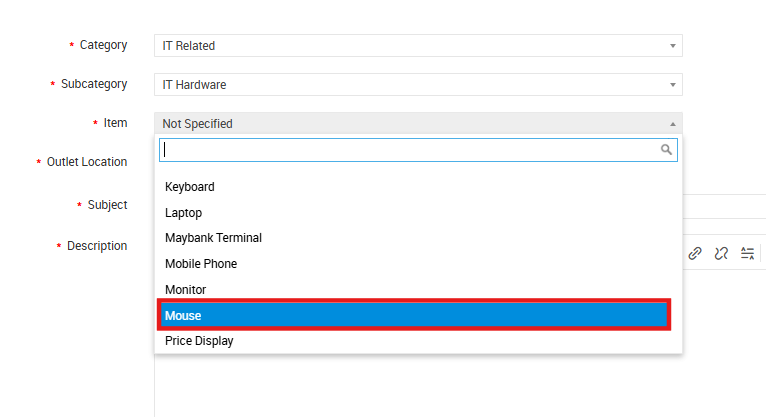
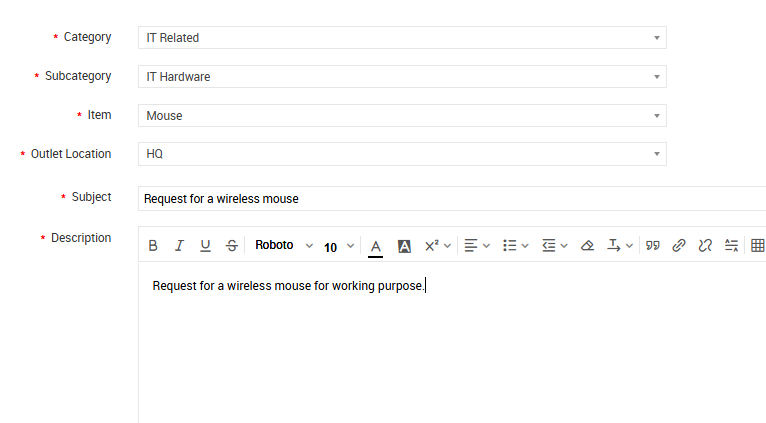
7. Select Item

Pick the specific Item related to your request.
๐Ÿ‘‰ Example: If you are requesting a mouse, select Mouse under the item list.

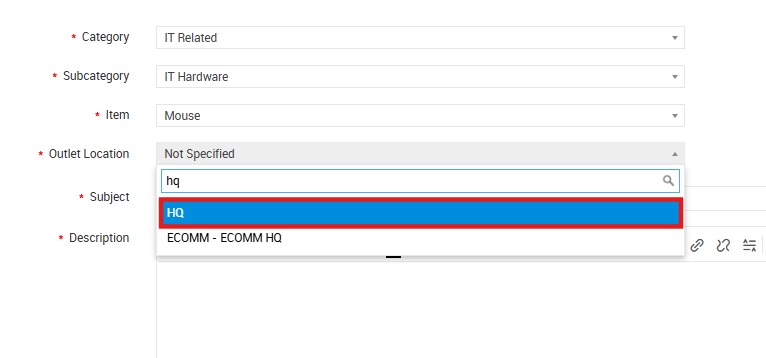
8. Select Outlet Location

Choose your Location (e.g., HQ, Outlets).

9. Enter Subject

Provide a clear Subject for your request.
๐Ÿ‘‰ Example: Request for a wireless mouse


10. Enter Description

Add a short Description explaining the purpose or details of your request.
๐Ÿ‘‰ Example: Request for a wireless mouse for working purpose

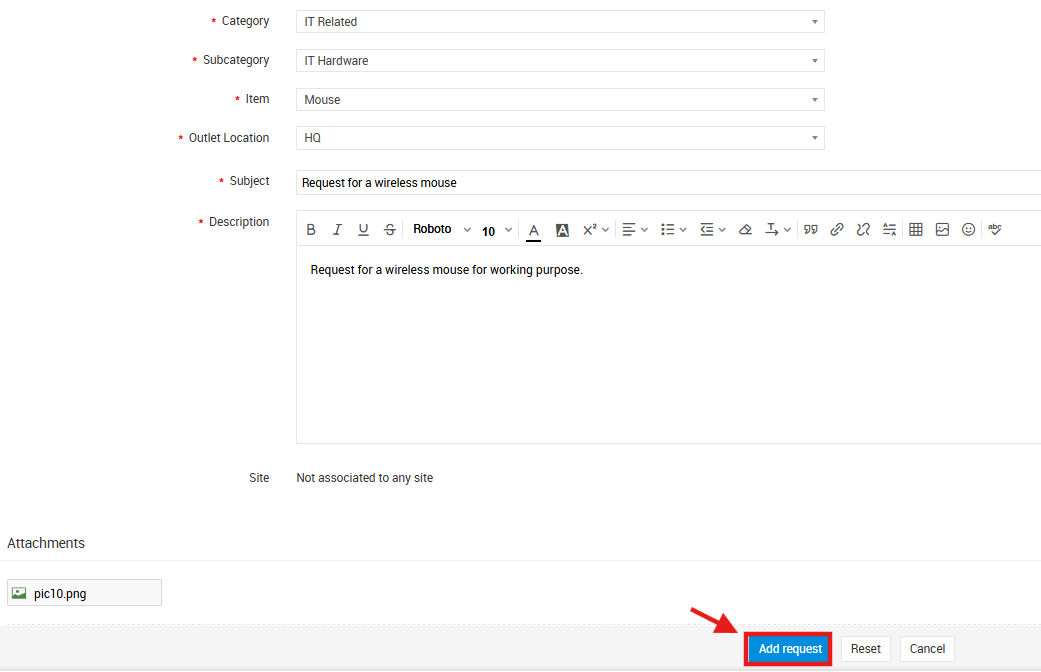
11. Add Attachments (Optional)

Upload any files or images that support your request (e.g., screenshots, photos, or forms).


12. Submit Request

Once all details are completed, click Add request to submit.
You will receive an email notification containing your ticket number, which you can use to track your request status.

end

Updated on 24/11/2025

© 2026

Scroll to top
  • Outlet Lists
  • Employee Directory
  • Stores Locator
  • KnowledgeBase
  • IT Forms
    • IT Equipment Checkout
    • Outlet IT Assets Handover Form